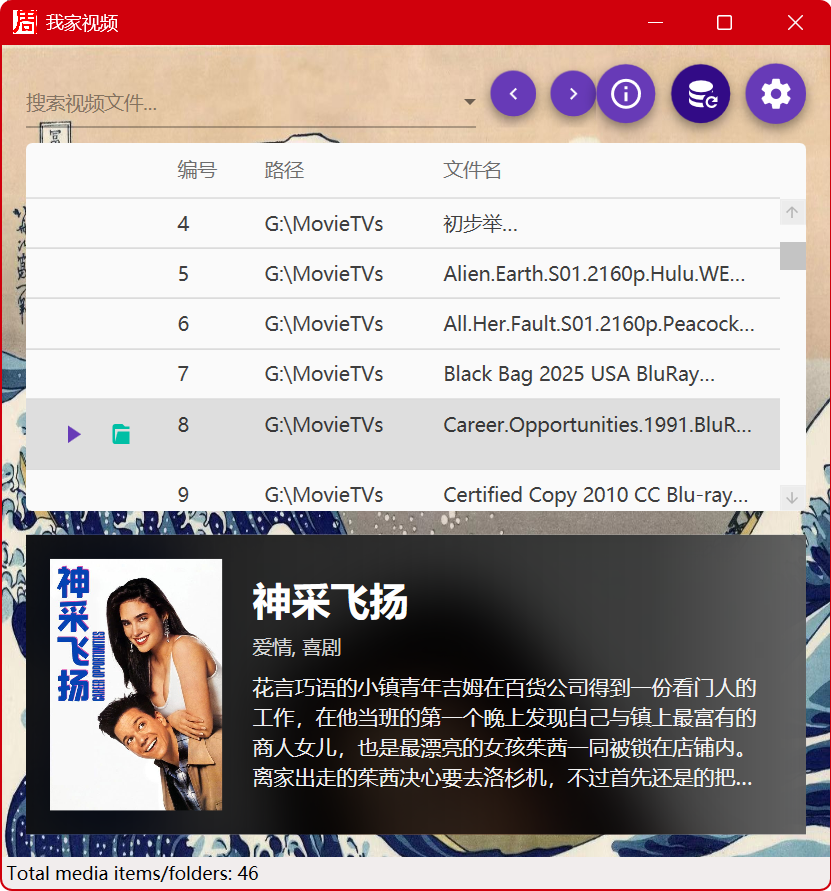
家里好几台NAS,手搓加AI写了一个极简的影音库整理工具,开源并免费,解决多个来源的影音文件整理和刮削问题,支持搜索。因为是自己的爱好,所以没有使用现成的解决方案,例如Jellyfin和Kodi。需要完整功能的应移步那里,尤其是因为它们内建了播放功能。
源代码和release(一个Windows上运行的.exe):https://github.com/transbot/LibVideo2
不方便访问GitHub的请直接在这里下载:源码 可执行文件。
注意:默认使用你安装的PotPlayer来播放,没有则使用系统默认插件软件,如果一种文件类型没有关联的播放软件,则打开所在目录。
欢迎fork、commit,随意修改和传播。要求使用VS2022编译。
LibVideo (我家视频)
🇺🇸 English Version
LibVideo is a modern, high-performance local video and music library management tool built on the WPF (MVVM) architecture. Combining a minimalist Material Design aesthetic with deep, intelligent metadata scraping, it offers a seamless, zero-latency, and immersive media selection experience.
🎯 Core Features
- Intelligent Metadata Scraping: Integrates with The Movie Database (TMDB) API. With a custom deep-regex filename sanitizer (which strips subtitle group tags, S01/E01 season marks, etc.), it achieves a 100% accurate match for official posters and plot summaries for movies and TV shows.
- Lightning-fast Offline Caching: All scraped data strictly lands in a lightweight serverless database (LiteDB). As long as a movie is matched online once, opening the app again results in a 0-millisecond display of images and text even offline, fully avoiding API rate-limit bans.
- Pure Audio Misidentification Prevention: Equipped with deep “nested folder scan detection,” pure music albums (
.mp3,.flac, etc.) are perfectly identified as “Audio” and will never be mis-scraped as a movie of the same name. - Immersive Glassmorphism UI: Movie cards automatically overlay the original poster with a frosted glass and dark-tint effect, delivering a premium, streaming-level poster wall visual experience.
🚀 Quick Start Guide
1. Software Setup & File Loading
- Click the Gear (Settings) button in the top right corner of the main interface.
- In the pop-up window, click “Add Directory” and select the root folders on your PC containing your movies, TV shows, or music albums. After adding, the system will instantly automatically scan the entire directory tree and save them into the underlying database.
2. Automatic Online Matching
- Single-click any video directory or file row in the list, and a dedicated floating card will pop up immediately below.
- If it’s your first time clicking, the system automatically sends a TMDB API request to intercept your media info. Subsequent clicks will be fully offline direct reads!
3. Custom Player
- Once you decide what to watch, simply double-click the list row or click the Play triangle icon that floats on the list to seamlessly launch your PC media player.
- By default, the system invokes the powerful 3rd-party player
PotPlayerthrough the registry. - If you have specific needs (e.g., VLC or MPC-HC), you can manually specify the
*.exeprogram by clicking “Browse” under Custom Player in the Settings interface.
4. Force Correction & Cache Clearing
- If a newly downloaded movie fails to match due to messy symbols in its name, after you rename it in your PC folder, directly click the Refresh button (circular rewind icon) next to the gear icon.
- This entirely wipes the incorrectly recorded historical metadata in the database, followed by a clean re-scan based on your new filename. (Don’t worry, your configured root directories will NOT be lost).
5. Smart History Search System
- Type any keyword like Star Trek in the top-left search box, and the list will instantly filter your video items on the fly.
- If you decide not to keep the search results, just click the X (Clear button) inside the right side of the search box.
- The system features an exclusive “Keystroke Intent Detector”. As long as you don’t actively press Backspace or Delete, the keyword is judged as a valid hotword and is automatically collected straight to the top of your dropdown history box.
- Use the “< Back, Forward >” buttons to seamlessly traverse your “search history snapshots”.
6. Automated Directory Monitoring (Seamless Sync)
- The software embeds an ultra-low power system-level file detection net (
FileSystemWatcher). - Whenever you download, add, delete, or rename media files in your mounted directories using external tools (like browsers or downloaders), the background nervous system detects it at the speed of light within 1 second, instantly triggering a smooth automatic list calibration. Truly unattended!
⚠️ FAQ (Frequently Asked Questions)
Prompted with “Windows protected your PC” on the first run?
As this project is a free, open-source software released by an independent developer, an expensive enterprise code-signing EV certificate has not yet been purchased. Thus, Windows Defender SmartScreen may intercept it on Windows 10/11 on its first launch. This software is 100% open-source and safe to use.
How to bypass in one click:
- In the blue popup interception window, click the text “More info” on the left.
- Then click the “Run anyway” button that appears in the bottom right corner of the window.
🇨🇳 简体中文 (Chinese Version)
LibVideo 是一款基于 WPF (MVVM) 架构打造的现代化、高性能本地影视及音乐库管理工具。它结合了极简的 Material Design 设计语言与深度的智能元数据削刮,为您提供零延迟的沉浸式选片体验。
🎯 核心特性
- 智能化信息刮削:集成 The Movie Database (TMDB) API,通过自研的深度正则文件名净化器(支持破除内嵌字幕组标识与季集号 S01/E01 等),百分百精准命中电影与剧集的官方海报和带有关联的中文剧情简介。
- 极速离线强缓存:全站搜刮数据物理落地轻量级无服务器数据库(LiteDB)!只要联网命中过一次,再次打开软件即便断网也能保持 0 毫秒展示图文界面(拒绝 API 限流封杀)。
- 纯音频防误杀机制:具备深度的“文件夹嵌套扫描侦测”,纯音乐专辑库(
.mp3,.flac等)自动完美识别为“音频”,永远不会被瞎刮削成同名电影。 - 沉浸式 Glassmorphism UI:电影卡片会自动将原海报做毛玻璃和暗光重叠处理,提供流媒体级别的精致海报墙观感。
🚀 快速上手说明
1. 软件设置与文件载入
- 点击主界面右上角的 齿轮(设置)按钮。
- 在弹出的窗口中点击 “添加视频目录”,选择您电脑中存放电影、剧集或音乐专辑的根文件夹。添加完毕后系统将自动进行全盘极速检索并将它们存入底层数据库。
2. 在线自动匹配
- 在列表中 单击选中 任何一行视频目录或文件,下方立刻自动弹出专属悬浮卡片框。
- 此时如果是首次点击,系统会自动发送 TMDB API 截取您的影像信息。以后再点击该项就是彻底的“免流离线直读”了!
3. 定制播放器
- 剧集看中后,您只需 双击列表行,或是点击列表上自动浮现的 向右播放小三角按键,即可无缝拉起电脑播放器。
- 系统默认在注册表层调用性能强悍的第三方神级播放器
PotPlayer。 - 如果您有特定的需求(例如 VLC 或 MPC-HC),同样在设置界面点击 “浏览” 手动指定
*.exe程序即可全局覆盖。如需恢复默认,只需留空即可。
4. 强制纠错与缓存清盘
- 有时候刚下载的一部新电影由于名字里多了一些怪符号匹配失败,您在电脑文件夹里将它改名之后,请直接点击界面 右上角齿轮边上的 刷新按钮(圆圈刷新图标)。
- 这将彻底抹除当前数据库中被错误记录的历史“元数据记忆”,随后按照您的新文件名进行干干净净的重新检索(请放心,之前配置好的管理目录均不会丢失)。
5. 极智历史搜索系统
- 在左上角的搜索框中输入任何影片关键词如“星际迷航”,此时输入框下方会瞬间为您即刻筛选视频项目。
- 若看毕不想保留该次搜索结果,直接点击搜索框右侧带圆圈的 X(清空按钮) 即可。
- 系统为您独创了**“按键意图探测器”**,只要在这个过程中您没有按键盘上的退格或Delete主动删字,这个词就会被系统判定为您刚想使用的热门长词,并将它自动收录进您下拉历史框的“置顶第一位”。
- 通过搜索框左侧的 “<前进、后退>”键 即可无缝穿梭您的“搜索历史快照”,再也不会为遗漏关键词而烦恼!
6. 自动化目录监控 (无缝同步)
- 软件已在底层植入了超低功耗的系统级文件探测网(
FileSystemWatcher)。 - 任何时候当您在外部环境中(比如通过迅雷或者浏览器)向已挂载的目录中下载、新增、删除或者重命名了影视文件,软件的后台神经系统都能在 1 秒钟内光速察觉,并立刻引发一次平滑的自动列表校准。界面的数字与条目将瞬间刷新出您刚倒腾好的新影片,真正做到无人值守!
⚠️ 常见问题 (FAQ)
首次运行提示“Windows 已保护你的电脑”?
由于本项目为独立开发者发行的免费开源软件,尚未购买昂贵的企业级代码签名证书(EV 证书),因此首次在 Windows 10/11 系统上运行时,可能会被 Windows Defender SmartScreen 拦截。本软件 100% 开源无毒,请放心使用。
一键放行方法:
- 在弹出的蓝色拦截窗口中,点击左侧的字样 「更多信息」 (More info)。
- 随后点击窗口右下方出现的 「仍要运行」 (Run anyway) 按钮即可。
📸 软件截图 / Screenshots


📚 推荐C#开发图书 / Recommended C# Books
-
《Visual C# 从入门到精通,第10版》

-
《深入CLR,第4版 中文限量版》(原CLR via C#)